Marketing, with a plan.

Social media management with AI

Create content with AI, schedule posts and answer customers in one workspace. Choose your business task and start with your first project.

Opens registration in the AI SMM app. Choose your tools after signing up. Plans and limits

AI SMMAI prepares. You decide.
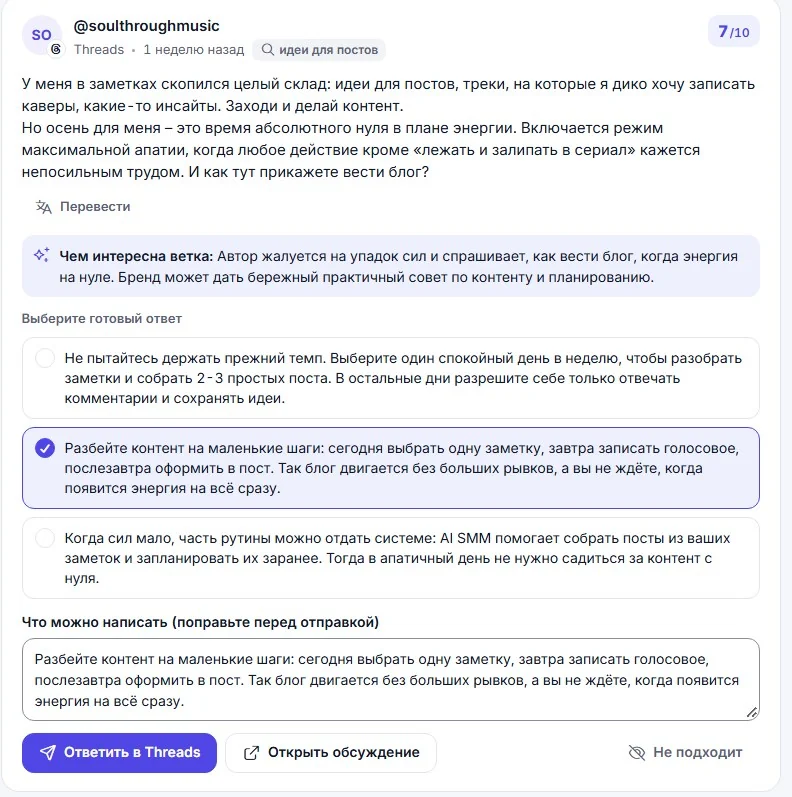
  1. Prepare a post

    Your topic → an AI-assisted draft → your edits.

  2. Review and schedule

    Choose the connected channels and confirm what goes live.

  3. Continue the conversation

    Answer a question and offer a link to your store or booking page.

Workflow example · illustrative data

Your business. A connected workflow.

Interactive example · illustrative data
AI SMM / Studio goodsDemo workspace

A customer journey

A conversation becomes an order.

A

01 Publish

Meet your new everyday favourite.

AI-assisted draft → review → scheduled post

Approved by your team

02 Conversation

M
New conversationCustomer & your business

Is the ceramic set available?

Here is the set in our store. You can choose your option and place an order.

Business knowledge + human handoff

03 Next step

New order

Ceramic collection

Awaiting confirmation
Continue in your workspace
AI SMM / Studio appointmentsDemo workspace

A customer journey

Interest finds a place in your schedule.

A

01 Publish

Make time for yourself this week.

AI-assisted draft → review → scheduled post

Approved by your team

02 Conversation

M
New conversationCustomer & your business

How can I book a consultation?

You can see the services and available times on our booking page. Choose the one that works for you.

Business knowledge + human handoff

03 Next step

New booking

Initial consultation

Time selected
Continue in your workspace
AI SMM / Expert workspaceDemo workspace

A customer journey

Your expertise starts the right conversation.

A

01 Publish

A practical guide to your next step.

AI-assisted draft → review → scheduled post

Approved by your team

02 Conversation

M
New conversationCustomer & your business

Can you help with my project?

Tell us a little about your goal. Our team can help you choose the right consultation.

Business knowledge + human handoff

03 Next step

Consultation request

Project discussion

Ready for follow-up
Continue in your workspace

From discovery to action

A clearer path to your next customer.

Choose the tools that fit your business. Connect them into a workflow your team can run.

01

Find your audience

Start where interest already exists.

Use the Chrome extension to explore audiences around competitors and relevant accounts. Choose who to engage with and build your outreach workflow.

Explore the Chrome extension
02

Create & publish

Keep your business in the conversation.

Prepare posts with AI, organise your content calendar and schedule publishing. Review your message before it reaches your audience.

Explore content & publishing
03

Talk & guide

Give every conversation a next step.

Build chat flows, answer recurring questions with a business knowledge base and bring a person into the conversation when needed.

Explore chat automation
04

Sell & book

Make it easy to choose you.

Connect the conversation to your online store or booking page. Keep orders and appointments close to the work that brings people in.

Explore stores & orders
05

Keep the relationship going.

Continue conversations, organise follow-up and bring people back with relevant email and messaging campaigns.

Explore follow-up ↗

Designed for people working together

AI helps create.
Your team stays in control.

Give people the access they need. Review content, assign responsibilities and agree on what goes live. Your workspace supports the way your team works.

For agencies & teams ↗
A clear approval workflowExample
AL
CreatorPrepares the draft
MK
ReviewerChecks the message
JD
ApproverApproves for publishing

Roles · Access · Approvals

Room to grow

Your next tool is already close.

Extend your workflow when your business needs it. Explore the capabilities before choosing what to connect.

Before you begin

Good questions.
Clear answers.

Visit the help center ↗
What is AI SMM?

AI SMM is a marketing and sales workspace for businesses and teams. It brings together content creation, scheduled publishing, chat automation, online stores, booking and tools for finding potential customers.

How do I get started?

Create an account and share information about your business, website and social profiles. Prepare and review your content and scenarios, then connect the accounts and services needed for launch. The steps depend on your business and chosen tools.

Can my team review content before publication?

Yes. Team roles and approval workflows help distribute work and control publishing. Set up access and the review process for the people working in your workspace.

Is it suitable for services as well as stores?

Yes. A store can use a catalog and orders; a service business can use a booking page and schedule. Experts can combine useful content, conversations and consultation requests.

Does AI work without my review?

You choose the content, scenarios and connections you launch. Review AI-generated materials and business knowledge before using them with customers. Your team can take over conversations when needed.

Where can I see plans and limits?

See the pricing page for current plans. Check the tools, usage limits and account connections you need before choosing a plan.

Your first steps

Start with one task.

You do not need to set up everything at once. Choose a workflow, check the requirements and prepare your first result.

  1. Choose a task

    Plan content, organise conversations or prepare a booking page. Start with what you need now.

  2. Set up your context

    Add your business information and connect the accounts needed for that workflow. Check access and plan limits.

  3. Review before launch

    Check the draft, settings and customer journey before publishing or enabling an automation.

Opens registration in the AI SMM app. Choose your tools after signing up.

Feature availability, AI usage and account limits depend on the chosen plan. Review the terms before connecting a paid service.