
TikTok

Schedule TikTok videos and photo carousels

Publish videos and photo carousels, and feed TikTok with clips cut from your long videos.

Opens registration in the AI SMM app. Choose your tools after signing up. Plans and limits

Tools for this channelTikTok
  1. Publishing

    Videos

  2. Analytics

    Views and likes

The available actions depend on the account type, permissions and network API.

What you can do in TikTok

Publishing

  • Videos
  • Photo carousels
  • Clips cut from long videos
Read more

Analytics

  • Views and likes
  • Followers and engagement rate
Read more
Sound familiar?

What gets in the way today
and how AI SMM removes it

TikTok wants videos you don’t have

Filming new clips every day is impossible while running a business.

With AI SMM: Cut clips from your long videos and publish them to TikTok on schedule.

Uploading from the phone at midnight

Every video needs a caption, a time and a manual upload.

With AI SMM: Videos and photo carousels go into the calendar with AI captions and publish on their own.

Views don’t show the trend

You see one video’s views, but not how the account is growing.

With AI SMM: Analytics tracks views, likes, followers and engagement rate next to your other networks.

Clips from your long videos

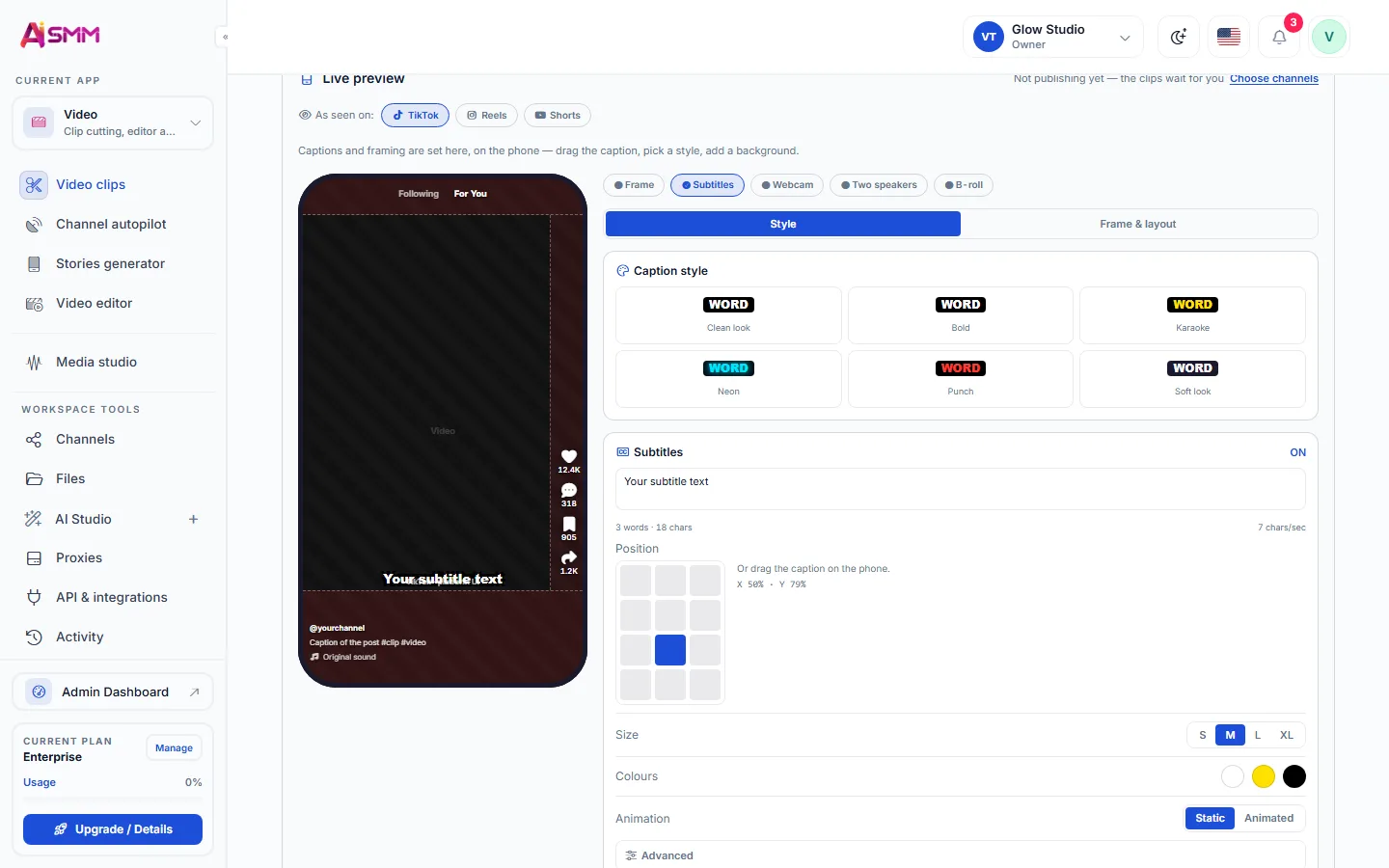
Paste a link to a podcast or stream and get vertical clips with subtitles. Before publishing, see each clip exactly as it will look in TikTok.

  • Caption styles from clean to karaoke and neon
  • Drag the caption right on the phone preview
Clips from your long videos

Videos and photo carousels on schedule

Plan TikTok alongside your other networks. Views, likes, followers and engagement rate come back into Pulse.

Videos and photo carousels on schedule

How businesses use it

Barbershop

One long video, five TikTok clips

A recorded haircut session is cut into short clips automatically, each with its own caption, feeding TikTok for a week from one shoot.

Handmade jewelry shop

A photo carousel for a new collection

New pieces get a carousel with a caption drafted by AI, published the same day photos are taken instead of a week later.

Language tutor

A weekly tips clip cut from a lesson

A recorded lesson yields a short tips clip each week, scheduled in advance so posting never depends on finding time that day.

Best time to post on TikTok for a small business

TikTok rewards consistency more than a single perfect hour: an account that posts a few times a week at roughly the same times builds a habit in its audience, while sporadic posting does not. Analytics shows views, likes, followers and engagement rate, which is the clearest signal for which posting rhythm your specific audience responds to.

Turning long videos into TikTok clips

Video clipping cuts a longer recording, a lesson, a demo, a behind-the-scenes walkthrough, into several short clips sized for TikTok, each with its own caption. This is the fastest way for a small business to keep a TikTok account fed without filming something new every time, because one shoot becomes a week of content.

AI Content Studio also generates a photo carousel and its caption directly from product photos, which suits a shop that does not shoot video regularly.

Scheduling TikTok videos and carousels ahead of time

Once clips are ready, scheduling them on a calendar removes the daily decision of what to post and when. The queue publishes at the planned time, and because the calendar sits alongside other networks, the same clip production feeds TikTok, Instagram Reels and YouTube Shorts from one place.

Reading TikTok engagement rate correctly

Engagement rate matters more than raw view count for a small account, because it shows how many of the people who saw a clip actually reacted to it. A clip with fewer views but a higher engagement rate points to content worth repeating, while high views with low engagement usually means the topic did not match the audience that found it.
Also in one calendar

Learn

Guides and lessons
to get results faster

All articles and tutorials

Questions

Does TikTok have a shared inbox for comments?

No, TikTok comments are not part of the shared inbox; publishing and analytics are covered, comments are answered in the TikTok app.

Can I post the same clip to TikTok and Instagram Reels?

Yes, a clip produced once can be scheduled to both, since each is a separate post in the calendar.

How many clips can one long video produce?

It depends on the source video’s length and content; a typical lesson or demo yields several short clips.

Is it safe to connect my account?

Yes. Accounts are connected through the network’s official sign-in, and you can disconnect them at any time.

Can I post to several networks at once?

Yes. One post goes to all selected networks, and AI adapts the text to each one’s limits.

Your first steps

Start with one task.

You do not need to set up everything at once. Choose a workflow, check the requirements and prepare your first result.

  1. Choose a task

    Plan content, organise conversations or prepare a booking page. Start with what you need now.

  2. Set up your context

    Add your business information and connect the accounts needed for that workflow. Check access and plan limits.

  3. Review before launch

    Check the draft, settings and customer journey before publishing or enabling an automation.

Opens registration in the AI SMM app. Choose your tools after signing up.

Feature availability, AI usage and account limits depend on the chosen plan. Review the terms before connecting a paid service.